> For the complete documentation index, see [llms.txt](https://docs.siboor.com/llms.txt). Markdown versions of documentation pages are available by appending `.md` to page URLs; this page is available as [Markdown](https://docs.siboor.com/siboor-trident-june/tuning-guides/pressure-advance.md).
# Pressure advance
#### Orca Slicer V-Shape Mode Pressure Advance Calibration Guide
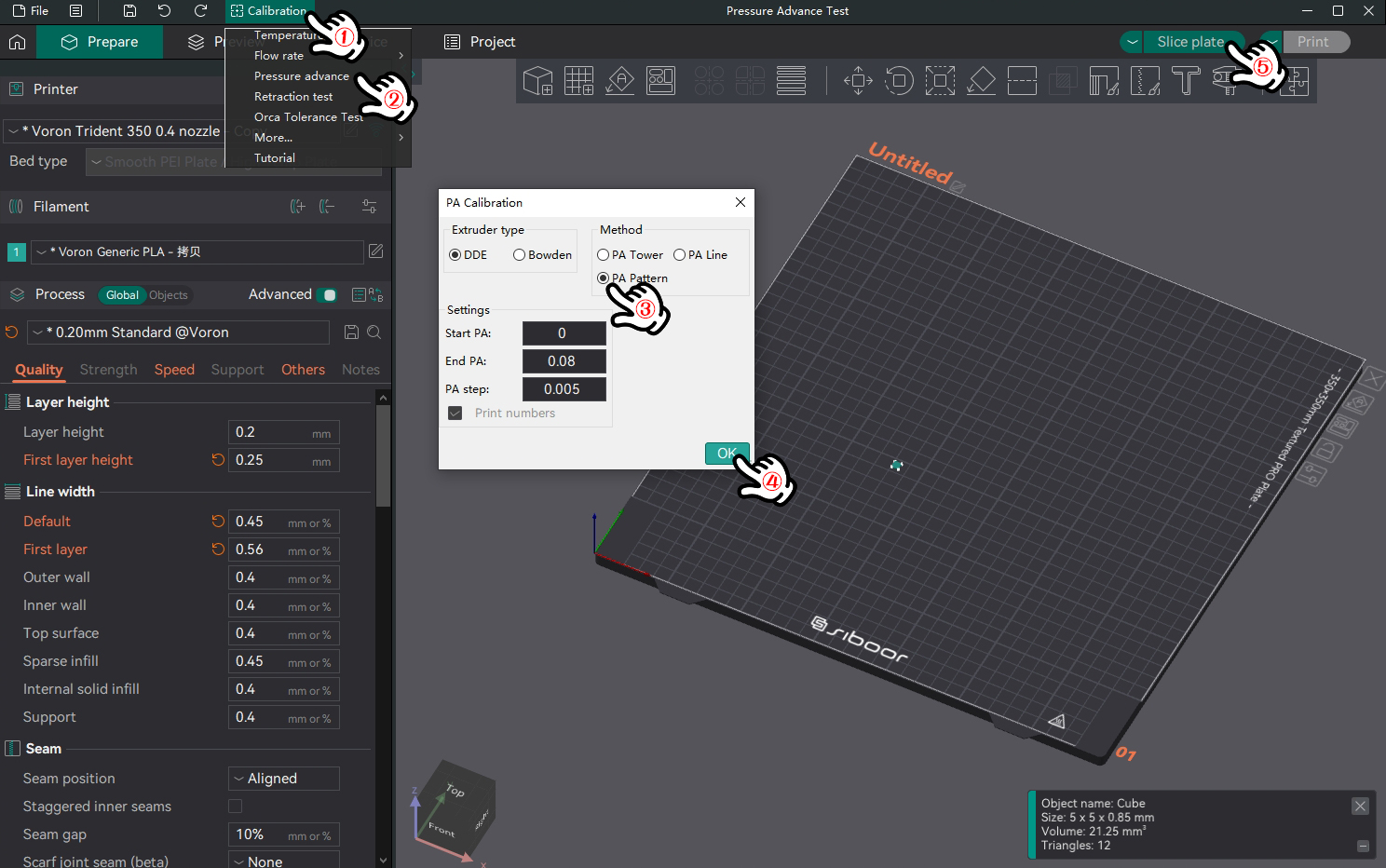
This guide explains how to calibrate the pressure advance setting using V-Shape Mode in Orca Slicer. You will need to adjust settings in `printer.cfg`, print a calibration pattern, and fine-tune the pressure advance value based on the print results.
**Preparation**
1. **Update `printer.cfg`**:
* Before starting the calibration, set `pressure_advance` to `0` in your `printer.cfg` file to ensure no pressure advance effect during the test.
```ini
[extruder]
pressure_advance = 0
```
**Calibration Process**
1. **Slice the Model**:
* Slice the model with V-Shape Mode enabled. Review the complete calibration pattern in the preview interface to confirm it’s correctly set up.
1. **Print the Calibration Model**:
* Print the calibration model with `pressure_advance` set to `0`.
* Examine the printed V-Shape pattern, especially the corners, for any signs of uneven extrusion or other issues.
**Evaluation and Adjustment**
1. **Evaluate Print Results**:
* Assess the V-Shape pattern, focusing on the clarity and consistency of the corners.
* Identify the pressure advance value that yields the best print quality.
1. **Adjust `pressure_advance`**:
* Update the `pressure_advance` value in your `printer.cfg` based on the results:
```ini
[extruder]
pressure_advance = 0.03
```
2. **Restart the Printer**:
* After updating the configuration, restart your printer to apply the new `pressure_advance` settings.
3. **Reprint and Verify**:
* Reprint the calibration model to confirm that the new `pressure_advance` value has improved the print quality.
**Finalizing Calibration**
1. **Confirm Results**:
* You can test the adjusted pressure\_advance value by printing a VORON cube to check the sharpness and consistency of the corners.
2. **Save Settings**:
* Once the calibration is satisfactory, save the settings for future prints.
By following these steps, you’ll effectively calibrate the pressure advance setting in Orca Slicer using V-Shape Mode, leading to improved print accuracy and quality.